Python クライアント ライブラリで Azure DocumentDB でベクター検索を使用します。 ベクター データを効率的に格納およびクエリします。
このクイック スタートでは、 text-embedding-3-small モデルから事前に計算されたベクターを含む JSON ファイル内のサンプル ホテル データセットを使用します。 データセットには、ホテル名、場所、説明、ベクター埋め込みなどが含まれます。
GitHub で サンプル コード を見つけます。
[前提条件]
Azure サブスクリプション
- Azure サブスクリプションをお持ちでない場合は、無料アカウントを作成してください
既存の Azure DocumentDB クラスター
クラスターがない場合は、新しいクラスターを作成します
-
カスタム ドメインの構成
text-embedding-3-smallモデルがデプロイされました
Azure Cloud Shell で Bash 環境を使用します。 詳細については、「Azure Cloud Shell の概要」を参照してください。

CLI 参照コマンドをローカルで実行する場合は、Azure CLI を インストール します。 Windows または macOS で実行している場合は、Docker コンテナーで Azure CLI を実行することを検討してください。 詳細については、「Docker コンテナーで Azure CLI を実行する方法」を参照してください。
ローカル インストールを使用する場合は、az login コマンドを使用して Azure CLI にサインインします。 認証プロセスを完了するには、ターミナルに表示される手順に従います。 その他のサインイン オプションについては、「 Azure CLI を使用した Azure への認証」を参照してください。
初回使用時にインストールを求められたら、Azure CLI 拡張機能をインストールします。 拡張機能の詳細については、「Azure CLI で拡張機能を使用および管理する」を参照してください。
az version を実行し、インストールされているバージョンおよび依存ライブラリを検索します。 最新バージョンにアップグレードするには、az upgrade を実行します。
- Python 3.9 以降
ベクターを使用してデータ ファイルを作成する
hotels データ ファイルの新しいデータ ディレクトリを作成します。
mkdir dataベクターを含む
Hotels_Vector.jsonraw データ ファイル をdataディレクトリにコピーします。
Python プロジェクトを作成する
プロジェクトの新しいディレクトリを作成し、Visual Studio Code で開きます。
mkdir vector-search-quickstart
code vector-search-quickstart
ターミナルで、仮想環境を作成してアクティブ化します。
Windows の場合:
python -m venv venv
venv\\Scripts\\activate
macOS/Linux の場合:
python -m venv venv
source venv/bin/activate
必要なパッケージをインストールします。
pip install pymongo azure-identity openai python-dotenv-
pymongo: Python 用 MongoDB ドライバー -
azure-identity: パスワードレス認証用の Azure ID ライブラリ -
openai: ベクトルを作成するための OpenAI クライアント ライブラリ -
python-dotenv: .env ファイルからの環境変数の管理
-
.envで環境変数のvector-search-quickstartファイルを作成します。# Identity for local developer authentication with Azure CLI AZURE_TOKEN_CREDENTIALS=AzureCliCredential # Azure OpenAI configuration AZURE_OPENAI_EMBEDDING_ENDPOINT= AZURE_OPENAI_EMBEDDING_MODEL=text-embedding-3-small AZURE_OPENAI_EMBEDDING_API_VERSION=2023-05-15 # Azure DocumentDB configuration MONGO_CLUSTER_NAME= # Data Configuration (defaults should work) DATA_FILE_WITH_VECTORS=../data/Hotels_Vector.json EMBEDDED_FIELD=DescriptionVector EMBEDDING_DIMENSIONS=1536 EMBEDDING_SIZE_BATCH=16 LOAD_SIZE_BATCH=50この記事で使用するパスワードレス認証の場合は、
.envファイル内のプレースホルダー値を独自の情報に置き換えます。-
AZURE_OPENAI_EMBEDDING_ENDPOINT: Azure OpenAI リソース エンドポイントの URL -
MONGO_CLUSTER_NAME: Azure DocumentDB リソース名
パスワードレス認証は常に優先する必要がありますが、追加のセットアップが必要になります。 マネージド ID の設定とさまざまな認証オプションの詳細については、「 Azure SDK for Python を使用して Azure サービスに対する Python アプリを認証する」を参照してください。
-
ベクター検索用のコード ファイルを作成する
ベクター検索用のコード ファイルを作成して、プロジェクトを続行します。 完了すると、プロジェクト構造は次のようになります。
├── data/
│   ├── Hotels.json              # Source hotel data (without vectors)
│   └── Hotels_Vector.json       # Hotel data with vector embeddings
└── vector-search-quickstart/
    ├── src/
    │   ├── diskann.py           # DiskANN vector search implementation
    │   ├── hnsw.py              # HNSW vector search implementation
    │   ├── ivf.py               # IVF vector search implementation
    │   └── utils.py              # Shared utility functions
    ├── requirements.txt         # Python dependencies
    ├── .env                     # Environment variables template
Python ファイルの src ディレクトリを作成します。 DiskANN インデックス実装の diskann.py と utils.py の 2 つのファイルを追加します。
mkdir src
touch src/diskann.py
touch src/utils.py
ベクター検索のコードを作成する
次のコードを diskann.py ファイルに貼り付けます。
import os
from typing import List, Dict, Any
from utils import get_clients, get_clients_passwordless, read_file_return_json, insert_data, print_search_results, drop_vector_indexes
from dotenv import load_dotenv

# Load environment variables
load_dotenv()


def create_diskann_vector_index(collection, vector_field: str, dimensions: int) -> None:

    print(f"Creating DiskANN vector index on field '{vector_field}'...")

    # Drop any existing vector indexes on this field first
    drop_vector_indexes(collection, vector_field)

    # Use the native MongoDB command for DocumentDB vector indexes
    index_command = {
        "createIndexes": collection.name,
        "indexes": [
            {
                "name": f"diskann_index_{vector_field}",
                "key": {
                    vector_field: "cosmosSearch"  # DocumentDB vector search index type
                },
                "cosmosSearchOptions": {
                    # DiskANN algorithm configuration
                    "kind": "vector-diskann",

                    # Vector dimensions must match the embedding model
                    "dimensions": dimensions,

                    # Vector similarity metric - cosine is good for text embeddings
                    "similarity": "COS",

                    # Maximum degree: number of edges per node in the graph
                    # Higher values improve accuracy but increase memory usage
                    "maxDegree": 20,

                    # Build parameter: candidates evaluated during index construction
                    # Higher values improve index quality but increase build time
                    "lBuild": 10
                }
            }
        ]
    }

    try:
        # Execute the createIndexes command directly
        result = collection.database.command(index_command)
        print("DiskANN vector index created successfully")

    except Exception as e:
        print(f"Error creating DiskANN vector index: {e}")

        # Check if it's a tier limitation and suggest alternatives
        if "not enabled for this cluster tier" in str(e):
            print("\nDiskANN indexes require a higher cluster tier.")
            print("Try one of these alternatives:")
            print("  • Upgrade your DocumentDB cluster to a higher tier")
            print("  • Use HNSW instead: python src/hnsw.py")
            print("  • Use IVF instead: python src/ivf.py")
        raise


def perform_diskann_vector_search(collection,
                                 azure_openai_client,
                                 query_text: str,
                                 vector_field: str,
                                 model_name: str,
                                 top_k: int = 5) -> List[Dict[str, Any]]:

    print(f"Performing DiskANN vector search for: '{query_text}'")

    try:
        # Generate embedding for the query text
        embedding_response = azure_openai_client.embeddings.create(
            input=[query_text],
            model=model_name
        )

        query_embedding = embedding_response.data[0].embedding

        # Construct the aggregation pipeline for vector search
        # DocumentDB uses $search with cosmosSearch
        pipeline = [
            {
                "$search": {
                    # Use cosmosSearch for vector operations in DocumentDB
                    "cosmosSearch": {
                        # The query vector to search for
                        "vector": query_embedding,

                        # Field containing the document vectors to compare against
                        "path": vector_field,

                        # Number of final results to return
                        "k": top_k
                    }
                }
            },
            {
                # Add similarity score to the results
                "$project": {
                    "document": "$$ROOT",
                    # Add search score from metadata
                    "score": {"$meta": "searchScore"}
                }
            }
        ]

        # Execute the aggregation pipeline
        results = list(collection.aggregate(pipeline))

        return results

    except Exception as e:
        print(f"Error performing DiskANN vector search: {e}")
        raise


def main():

    # Load configuration from environment variables
    config = {
        'cluster_name': os.getenv('MONGO_CLUSTER_NAME'),
        'database_name': 'Hotels',
        'collection_name': 'hotels_diskann',
        'data_file': os.getenv('DATA_FILE_WITH_VECTORS', '../data/Hotels_Vector.json'),
        'vector_field': os.getenv('EMBEDDED_FIELD', 'DescriptionVector'),
        'model_name': os.getenv('AZURE_OPENAI_EMBEDDING_MODEL', 'text-embedding-3-small'),
        'dimensions': int(os.getenv('EMBEDDING_DIMENSIONS', '1536')),
        'batch_size': int(os.getenv('LOAD_SIZE_BATCH', '100'))
    }

    try:
        # Initialize clients
        print("\nInitializing MongoDB and Azure OpenAI clients...")
        mongo_client, azure_openai_client = get_clients_passwordless()

        # Get database and collection
        database = mongo_client[config['database_name']]
        collection = database[config['collection_name']]

        # Load data with embeddings
        print(f"\nLoading data from {config['data_file']}...")
        data = read_file_return_json(config['data_file'])
        print(f"Loaded {len(data)} documents")

        # Verify embeddings are present
        documents_with_embeddings = [doc for doc in data if config['vector_field'] in doc]
        if not documents_with_embeddings:
            raise ValueError(f"No documents found with embeddings in field '{config['vector_field']}'. "
                           "Please run create_embeddings.py first.")

        # Insert data into collection
        print(f"\nInserting data into collection '{config['collection_name']}'...")

        # Insert the hotel data
        stats = insert_data(
            collection,
            documents_with_embeddings,
            batch_size=config['batch_size']
        )

        if stats['inserted'] == 0 and not stats.get('skipped'):
            raise ValueError("No documents were inserted successfully")

        # Create DiskANN vector index (skip if data was already present)
        if not stats.get('skipped'):
            create_diskann_vector_index(
                collection,
                config['vector_field'],
                config['dimensions']
            )

            # Wait briefly for index to be ready
            import time
            print("Waiting for index to be ready...")
            time.sleep(2)

        # Perform sample vector search
        query = "quintessential lodging near running trails, eateries, retail"

        results = perform_diskann_vector_search(
            collection,
            azure_openai_client,
            query,
            config['vector_field'],
            config['model_name'],
            top_k=5
        )

        # Display results
        print_search_results(results, max_results=5, show_score=True)


    except Exception as e:
        print(f"\nError during DiskANN demonstration: {e}")
        raise

    finally:
        # Close the MongoDB client
        if 'mongo_client' in locals():
            mongo_client.close()


if __name__ == "__main__":
    main()
このメイン モジュールには、次の機能があります。
ユーティリティ関数を含む
環境変数の構成オブジェクトを作成します。
Azure OpenAI および Azure DocumentDB 用のクライアントを作成します
MongoDB に接続し、データベースとコレクションを作成し、データを挿入して、標準インデックスを作成します
IVF、HNSW、または DiskANN を使用してベクター インデックスを作成します。
OpenAI クライアントを使用して、サンプル クエリ テキストの埋め込みを作成します。 ファイルの先頭にあるクエリを変更できます
埋め込みを使用してベクター検索を実行し、結果を出力します
ユーティリティ関数を作成する
次のコードを utils.pyに貼り付けます。
import json
import os
import time
import warnings
from typing import Dict, List, Any, Optional, Tuple

# Suppress the PyMongo CosmosDB cluster detection warning
# Must be set before importing pymongo
warnings.filterwarnings(
    "ignore",
    message="You appear to be connected to a CosmosDB cluster.*",
)

from pymongo import MongoClient, InsertOne
from pymongo.collection import Collection
from pymongo.errors import BulkWriteError
from azure.identity import DefaultAzureCredential
from pymongo.auth_oidc import OIDCCallback, OIDCCallbackContext, OIDCCallbackResult
from openai import AzureOpenAI
from dotenv import load_dotenv

# Load environment variables from .env file
load_dotenv()

class AzureIdentityTokenCallback(OIDCCallback):
    def __init__(self, credential):
        self.credential = credential

    def fetch(self, context: OIDCCallbackContext) -> OIDCCallbackResult:
        token = self.credential.get_token(
            "https://ossrdbms-aad.database.windows.net/.default").token
        return OIDCCallbackResult(access_token=token)

def get_clients() -> Tuple[MongoClient, AzureOpenAI]:

    # Get MongoDB connection string - required for DocumentDB access
    mongo_connection_string = os.getenv("MONGO_CONNECTION_STRING")
    if not mongo_connection_string:
        raise ValueError("MONGO_CONNECTION_STRING environment variable is required")

    # Create MongoDB client with optimized settings for DocumentDB
    mongo_client = MongoClient(
        mongo_connection_string,
        maxPoolSize=50,  # Allow up to 50 connections for better performance
        minPoolSize=5,   # Keep minimum 5 connections open
        maxIdleTimeMS=30000,  # Close idle connections after 30 seconds
        serverSelectionTimeoutMS=5000,  # 5 second timeout for server selection
        socketTimeoutMS=20000  # 20 second socket timeout
    )

    # Get Azure OpenAI configuration
    azure_openai_endpoint = os.getenv("AZURE_OPENAI_EMBEDDING_ENDPOINT")
    azure_openai_key = os.getenv("AZURE_OPENAI_EMBEDDING_KEY")

    if not azure_openai_endpoint or not azure_openai_key:
        raise ValueError("Azure OpenAI endpoint and key are required")

    # Create Azure OpenAI client for generating embeddings
    azure_openai_client = AzureOpenAI(
        azure_endpoint=azure_openai_endpoint,
        api_key=azure_openai_key,
        api_version=os.getenv("AZURE_OPENAI_EMBEDDING_API_VERSION", "2023-05-15")
    )

    return mongo_client, azure_openai_client


def get_clients_passwordless() -> Tuple[MongoClient, AzureOpenAI]:

    # Get MongoDB cluster name for passwordless authentication
    cluster_name = os.getenv("MONGO_CLUSTER_NAME")
    if not cluster_name:
        raise ValueError("MONGO_CLUSTER_NAME environment variable is required")

    # Create credential object for Azure authentication
    credential = DefaultAzureCredential()

    authProperties = {"OIDC_CALLBACK": AzureIdentityTokenCallback(credential)}

    # Create MongoDB client with Azure AD token callback
    mongo_client = MongoClient(
        f"mongodb+srv://{cluster_name}.global.mongocluster.cosmos.azure.com/",
        connectTimeoutMS=120000,
        tls=True,
        retryWrites=True,
        authMechanism="MONGODB-OIDC",
        authMechanismProperties=authProperties
    )

    # Get Azure OpenAI endpoint
    azure_openai_endpoint = os.getenv("AZURE_OPENAI_EMBEDDING_ENDPOINT")
    if not azure_openai_endpoint:
        raise ValueError("AZURE_OPENAI_EMBEDDING_ENDPOINT environment variable is required")

    # Create Azure OpenAI client with credential-based authentication
    azure_openai_client = AzureOpenAI(
        azure_endpoint=azure_openai_endpoint,
        azure_ad_token_provider=lambda: credential.get_token("https://cognitiveservices.azure.com/.default").token,
        api_version=os.getenv("AZURE_OPENAI_EMBEDDING_API_VERSION", "2023-05-15")
    )

    return mongo_client, azure_openai_client


def azure_identity_token_callback(credential: DefaultAzureCredential) -> str:

    # DocumentDB requires this specific scope
    token_scope = "https://cosmos.azure.com/.default"

    # Get token from Azure AD
    token = credential.get_token(token_scope)

    return token.token


def read_file_return_json(file_path: str) -> List[Dict[str, Any]]:

    try:
        with open(file_path, 'r', encoding='utf-8') as file:
            return json.load(file)
    except FileNotFoundError:
        print(f"Error: File '{file_path}' not found")
        raise
    except json.JSONDecodeError as e:
        print(f"Error: Invalid JSON in file '{file_path}': {e}")
        raise


def write_file_json(data: List[Dict[str, Any]], file_path: str) -> None:

    try:
        with open(file_path, 'w', encoding='utf-8') as file:
            json.dump(data, file, indent=2, ensure_ascii=False)
        print(f"Data successfully written to '{file_path}'")
    except IOError as e:
        print(f"Error writing to file '{file_path}': {e}")
        raise


def insert_data(collection: Collection, data: List[Dict[str, Any]],
                batch_size: int = 100, index_fields: Optional[List[str]] = None) -> Dict[str, int]:

    total_documents = len(data)

    # Check if data already exists in the collection
    existing_count = collection.count_documents({})
    if existing_count >= total_documents:
        print(f"Collection already has {existing_count} documents, skipping insert and index creation")
        return {'total': total_documents, 'inserted': 0, 'failed': 0, 'skipped': True}

    # Clear existing data if counts don't match to ensure clean state
    if existing_count > 0:
        print(f"Collection has {existing_count} documents but expected {total_documents}, clearing and re-inserting...")
        collection.delete_many({})

    inserted_count = 0
    failed_count = 0

    print(f"Starting batch insertion of {total_documents} documents...")

    # Create indexes if specified
    if index_fields:
        for field in index_fields:
            try:
                collection.create_index(field)
                print(f"Created index on field: {field}")
            except Exception as e:
                print(f"Warning: Could not create index on {field}: {e}")

    # Process data in batches to manage memory and error recovery
    for i in range(0, total_documents, batch_size):
        batch = data[i:i + batch_size]
        batch_num = (i // batch_size) + 1
        total_batches = (total_documents + batch_size - 1) // batch_size

        try:
            # Prepare bulk insert operations
            operations = [InsertOne(document) for document in batch]

            # Execute bulk insert
            result = collection.bulk_write(operations, ordered=False)
            inserted_count += result.inserted_count

            print(f"Batch {batch_num} completed: {result.inserted_count} documents inserted")

        except BulkWriteError as e:
            # Handle partial failures in bulk operations
            inserted_count += e.details.get('nInserted', 0)
            failed_count += len(batch) - e.details.get('nInserted', 0)

            print(f"Batch {batch_num} had errors: {e.details.get('nInserted', 0)} inserted, "
                  f"{failed_count} failed")

            # Print specific error details for debugging
            for error in e.details.get('writeErrors', []):
                print(f"  Error: {error.get('errmsg', 'Unknown error')}")

        except Exception as e:
            # Handle unexpected errors
            failed_count += len(batch)
            print(f"Batch {batch_num} failed completely: {e}")

        # Small delay between batches to avoid overwhelming the database
        time.sleep(0.1)

    # Return summary statistics
    stats = {
        'total': total_documents,
        'inserted': inserted_count,
        'failed': failed_count
    }

    return stats


def drop_vector_indexes(collection, vector_field: str) -> None:

    try:
        # Get all indexes for the collection
        indexes = list(collection.list_indexes())

        # Find vector indexes on the specified field
        vector_indexes = []
        for index in indexes:
            if 'key' in index and vector_field in index['key']:
                if index['key'][vector_field] == 'cosmosSearch':
                    vector_indexes.append(index['name'])

        # Drop each vector index found
        for index_name in vector_indexes:
            print(f"Dropping existing vector index: {index_name}")
            collection.drop_index(index_name)

        if vector_indexes:
            print(f"Dropped {len(vector_indexes)} existing vector index(es)")
        else:
            print("No existing vector indexes found to drop")

    except Exception as e:
        print(f"Warning: Could not drop existing vector indexes: {e}")
        # Continue anyway - the error might be that no indexes exist


def print_search_resultsx(results: List[Dict[str, Any]],
                        max_results: int = 5,
                        show_score: bool = True) -> None:

    if not results:
        print("No search results found.")
        return

    print(f"\nSearch Results (showing top {min(len(results), max_results)}):")
    print("=" * 80)

    for i, result in enumerate(results[:max_results], 1):

        # Display hotel name and ID
        print(f"HotelName: {result['HotelName']}, Score: {result['score']:.4f}")

def print_search_results(results: List[Dict[str, Any]],
                        max_results: int = 5,
                        show_score: bool = True) -> None:

    if not results:
        print("No search results found.")
        return

    print(f"\nSearch Results (showing top {min(len(results), max_results)}):")
    print("=" * 80)

    for i, result in enumerate(results[:max_results], 1):

        # Check if results are nested under 'document' (when using $$ROOT)
        if 'document' in result:
            doc = result['document']
        else:
            doc = result

        # Display hotel name and ID
        print(f"HotelName: {doc['HotelName']}, Score: {result['score']:.4f}")


    if len(results) > max_results:
        print(f"\n... and {len(results) - max_results} more results")
このユーティリティ モジュールには、次の機能があります。
-
get_clients: Azure OpenAI と Azure DocumentDB のクライアントを作成して返します。 -
get_clients_passwordless: パスワードレス認証を使用して、Azure OpenAI および Azure DocumentDB のクライアントを作成して返します。 -
azure_identity_token_callback: MongoDB OIDC 認証で使用される Azure AD トークンを取得します。 -
read_file_return_json: JSON ファイルを読み取り、その内容をオブジェクトの配列として返します。 -
write_file_json: オブジェクトの配列を JSON ファイルに書き込みます。 -
insert_data: MongoDB コレクションにデータをバッチで挿入し、指定されたフィールドに標準インデックスを作成します。 -
drop_vector_indexes: ターゲット ベクター フィールドの既存のベクター インデックスを削除します。 -
print_search_results:スコアやホテル名を含むベクター検索結果を出力します。
Azure CLI で認証する
アプリケーションを実行する前に Azure CLI にサインインして、Azure リソースに安全にアクセスできるようにします。
az login
このコードでは、ローカル開発者認証を使用して Azure DocumentDB と Azure OpenAI にアクセスします。
AZURE_TOKEN_CREDENTIALS=AzureCliCredential設定すると、この設定により、認証に Azure CLI 資格情報を決定的に使用するように関数に指示されます。 認証は、Azure ID からの DefaultAzureCredential に依存して、環境内で Azure 資格情報を検索します。 Azure Id ライブラリを使用して Azure サービスに対して Python アプリを認証する方法について説明します。
アプリケーションを実行する
Python スクリプトを実行するには:
ベクター検索クエリとその類似性スコアに一致する上位 5 つのホテルが表示されます。
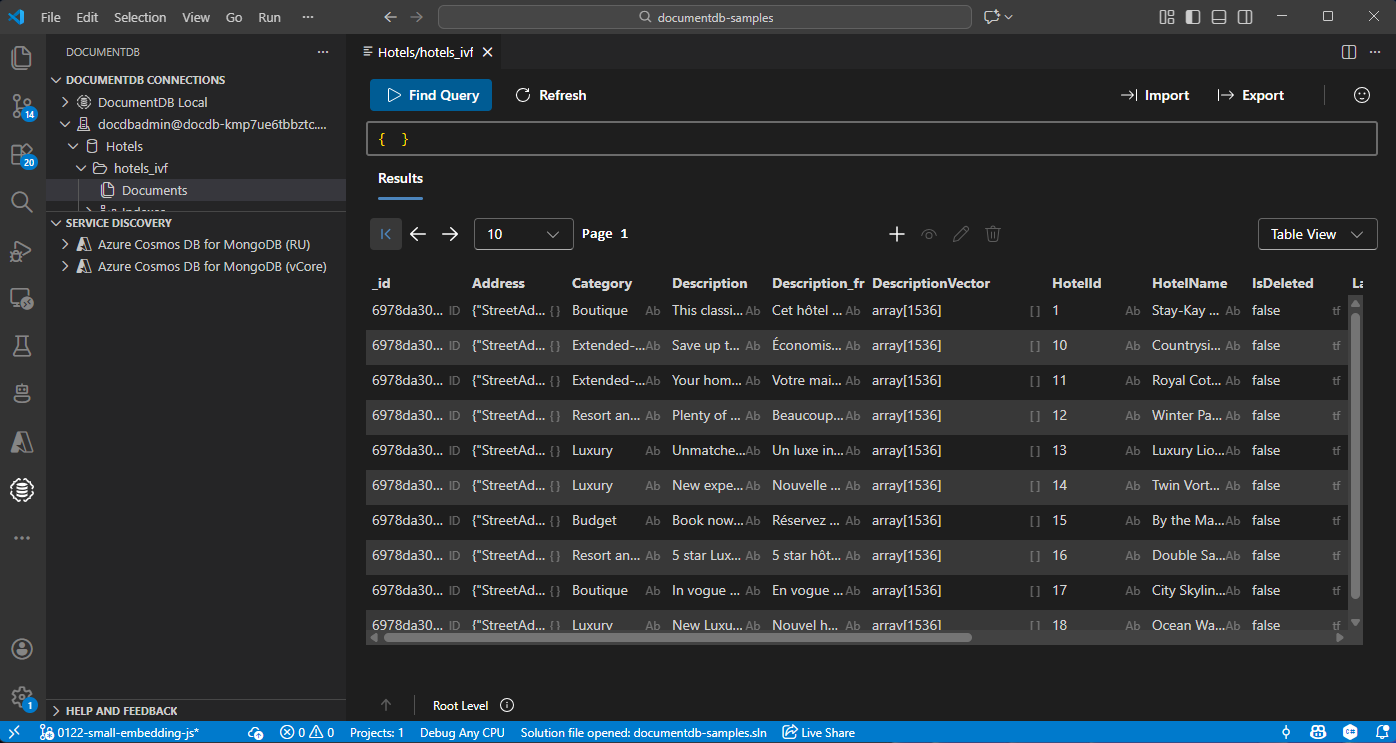
Visual Studio Code でデータを表示および管理する
Visual Studio Code で DocumentDB 拡張機能 を選択して、Azure DocumentDB アカウントに接続します。
Hotels データベースのデータとインデックスを表示します。
リソースをクリーンアップする
追加コストを回避するためにリソース グループ、Azure DocumentDB アカウント、Azure OpenAI リソースが不要な場合は、リソース グループ、Azure OpenAI リソースを削除します。